Archives: Projects
Projects

Network Security
Vulnerability Management Project
Company: Home Lab
The project also looked at exploring the options available to automate the process of patching. In particular, I explored the demonstration version of Tanium, how that allows for effecive patch management for software and differen opeating systems, as well as more specialised software, such as Jamf for Apple.
Vulnerability Assessment:
- Installed and set up the Vulnerability assessment tools
- Carried out an assessment of devices on the network
- Read report and use results to identify key threats and plan on how to solve them
- Set up a scheduled automated scan and and report to
Game Design
Development of a Video Game
Fool's Mate - Game Development
As preporation for the development phase of the project, I carried out my own personal learning with Unity, developing smaller projects to learn the features and functions of the engine as well as to gain experiance with using C#, which was a language I had no experiance of previous to this project.
During the development phase of the project, I was responsable for the programing and management of the game engine, and importing the sprites and audio files developed by the other members. As part of this, I was responsable for the testing of the game both through the development process, as well as during key quality control sections, developing and then following a test plan to ensure it functioned correctly. Furthermore, I was also responsable for creating the animantions from spritesheets accuratly to how was planned, and using the Unity animations features to do so, which further allowed elements such non-playable cutscenese, such as the 'fox chase' scene illustrated in the demo video.

Digital Forensics
Mock Forensics investigation

Investigation of a Windows Disk Image:
- Carried out integrity checks through hashing to ensure that the image remained unchanged.
- Investigated using Autopsy to identify any files of interest within the image.
- Carried out manual file carving of hidden files within the disc image.
- Documented investigation through contemporaneous notes.
- Identified accounts of interest regarding the investigation.
- Followed timelines of events carried out, including the deletion of files.
- Identify the use of tools attempting to manipulate evidence, such as modifying the files creation time.
- Identify information. from metadata that assists with the investigation, such as location data.
- Identify evidence of manipulation of image data and hiding of information.
- Recovering data hidden through steganography.
- Follow a timeline of behaviours by the user in the time of the incident.
- Identify what external devices and network connections were used within the incident.
Network Management
Emulating a Vlan across a VPN
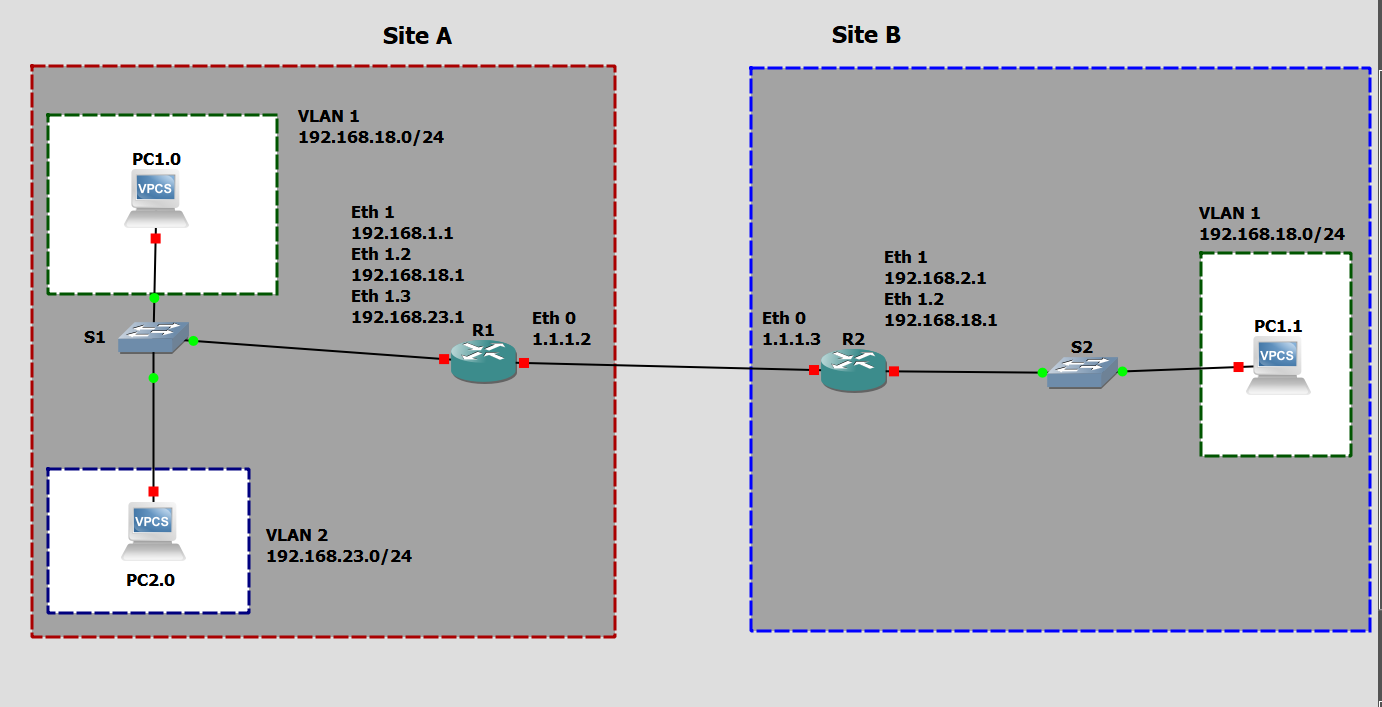
Steps taken:
- Installed and configured Vyos based routers using GSN3
- Set up an IPsec tunnel between both routers.
- Within one premises, created two isolated subnets, with on subnet connecting to the other premises.
- Documented work carried out as well as testing to ensure that the network operated correctly and met the criteria.
Network Management
Developing and Managing a Windows based LAN network
Managing a Windows Network

- Installed three Windows Vista client and one Windows Server 2008 machines.
- Installed software, and managed peritherials such as a shared printer, including installing required drivers.
- Created multiple users and managed permissions using Active Directory.
- Implemented Group Policies for users within Active Directory.
- Utilised tools to monitor and manage the network traffic and create alerts.
- Carried out methodical testing and troubleshooting of hardware and network configurations.
- Created and tested patch cables for each machine, and managed layer-2 switch.
Network Management
Managing a Linux based network
Virtual Linux Network

Company: Home Lab
Current progress:
Current progress:
- Created a Rasberian based server within a Virtual Machine, and created user profiles.
- Implemented DHCP, DNS and FTP within the Rasbarian Server.
- Connected multiple Client Virtual Machines to connect through a switch on GSN3.
- Implemented a Domain Controller on the server using Samba, including various users on the domain.
- Implement a IDS/IPS
- Collect and monitor data through a SIEM